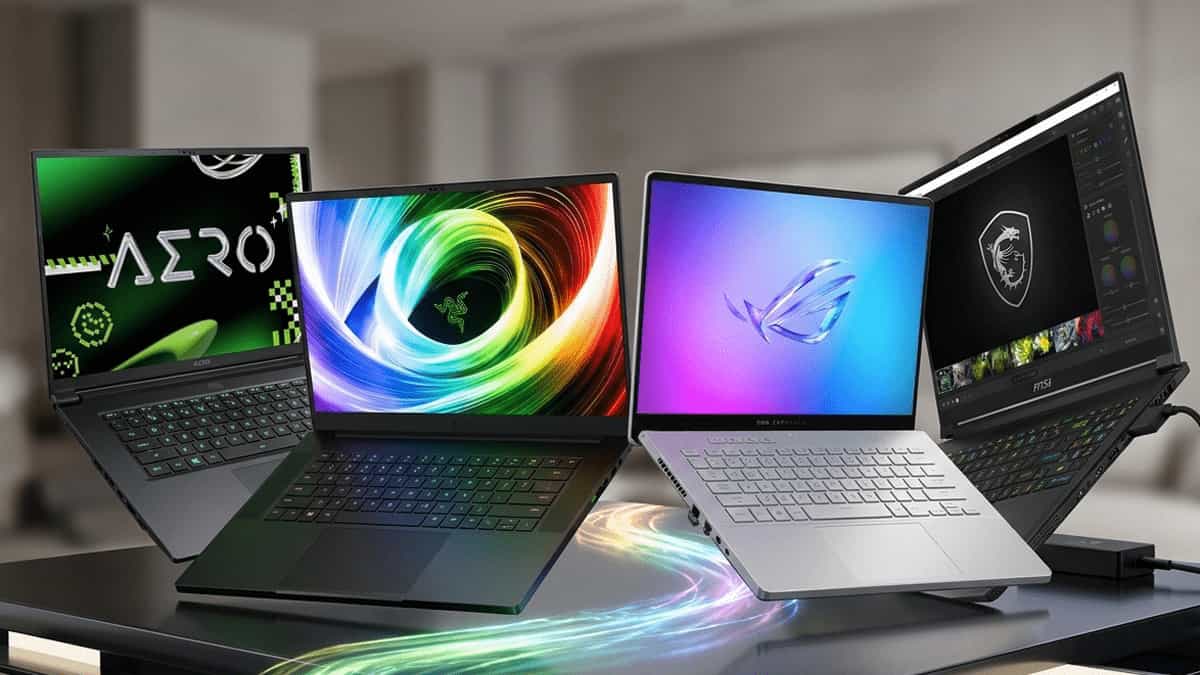
You’re in the market for a laptop that can handle 3D rendering, video editing, and high‑refresh gaming without compromise. The GIGABYTE AERO X16 enters the scene as a Copilot+ PC with a Ryzen AI processor, RTX 5050 graphics, and a stunning 165Hz WQXGA display. It promises the perfect blend of creator tools and gaming horsepower.
But it’s not alone. The ASUS ROG Zephyrus G16, MSI Stealth 16, and Razer Blade 16 all occupy the same premium space, each with their own design philosophy, thermal solutions, and AI capabilities.
On paper, they look similar. In reality, differences in build quality, software ecosystems, port selection, and real‑world performance can make one a clear winner for your specific workflow.
Let’s cut through the hype and find out which premium creator laptop is actually worth your investment.
⚠️ Quick Note: Copilot+ & AI Features
The GIGABYTE AERO X16 is marketed as a Copilot+ PC, meaning it includes dedicated AI acceleration (via the Ryzen AI NPU) and Windows 11 AI features like Recall, Live Captions, and enhanced Studio Effects. Competitors also offer similar AI capabilities – the key difference lies in how well they’re integrated and whether they come with additional creator‑centric software.
At a Glance: The Contenders
| Model | Key Strengths |
|---|---|
| GIGABYTE AERO X16 | Copilot+ AI features, RTX 5050, stunning 16:10 WQXGA display, sleek all‑metal build |
| ASUS ROG Zephyrus G16 | OLED display option, excellent speakers, premium build, strong creator/gaming balance |
| MSI Stealth 16 | Ultra‑thin design, RTX 50‑series options, great port selection, quiet operation |
| Razer Blade 16 | Dual‑mode display (4K 120Hz / FHD 240Hz), CNC aluminum unibody, premium feel |
All four target the high‑end creator‑gamer segment, with prices typically ranging from $1,800 to $2,800. They share 16‑inch 16:10 displays, powerful CPUs, and dedicated GPUs, but their tuning and target audience differ.
Full Feature Comparison Table
| Feature | GIGABYTE AERO X16 | ASUS ROG Zephyrus G16 | MSI Stealth 16 | Razer Blade 16 |
|---|---|---|---|---|
| CPU | AMD Ryzen AI 7 350 | Intel Core Ultra 9 185H / AMD Ryzen AI 9 | Intel Core Ultra 7/9 | Intel Core i9‑14900HX / Ultra 9 |
| GPU | NVIDIA GeForce RTX 5050 (8GB) | RTX 4060 / 4070 / 4080 | RTX 4060 / 4070 / 4080 | RTX 4060 / 4070 / 4080 / 4090 |
| AI Accelerator | Ryzen AI NPU (Copilot+) | NPU on Intel/AMD models | NPU on Intel Ultra | NPU on Intel Ultra |
| RAM | 16GB DDR5 (upgradable) | 16GB / 32GB LPDDR5X (soldered on some) | 16GB / 32GB DDR5 (upgradable) | 16GB / 32GB / 64GB DDR5 (upgradable) |
| Storage | 1TB PCIe 4.0 SSD | 1TB / 2TB PCIe 4.0 SSD | 1TB / 2TB PCIe 4.0 SSD | 1TB / 2TB PCIe 4.0 SSD |
| Display | 16″ WQXGA (2560×1600) 165Hz, 100% DCI‑P3, IPS | 16″ 2.5K 240Hz OLED / 165Hz IPS | 16″ 4K 60Hz / 2.5K 240Hz IPS | 16″ Dual‑Mode: 4K 120Hz + FHD 240Hz (Mini‑LED) |
| Battery | 99Wh | 90Wh | 99Wh | 95Wh |
| Weight | 2.1 kg | 1.85 kg (OLED) / 2.0 kg | 1.99 kg | 2.45 kg |
| Build | CNC aluminum | Aluminum + magnesium | Magnesium alloy | CNC aluminum unibody |
| Ports | Thunderbolt 4 (USB‑C), USB‑A, HDMI 2.1, SD card reader | Thunderbolt 4, USB‑A, HDMI 2.1, audio | Thunderbolt 4, USB‑A, HDMI 2.1, LAN | Thunderbolt 4, USB‑A, HDMI 2.1, SD card reader |
| Price Range | Mid‑high | Mid‑high | High | Very high |
Where These Laptops Actually Differ
(This Changes Your Choice)
1. Display Technology – OLED vs. Mini‑LED vs. High‑Refresh IPS
- GIGABYTE AERO X16 – 165Hz IPS with excellent color accuracy (100% DCI‑P3). Great for creators, but no OLED deep blacks.
- ASUS ROG Zephyrus G16 – Optional OLED panel with 240Hz refresh. Incredible contrast and response time – ideal for both creative work and gaming. However, some users worry about burn‑in (though modern panels have mitigation).
- MSI Stealth 16 – Offers a 4K 60Hz panel for pure creators or a 2.5K 240Hz IPS for gamers. No OLED option in this lineup.
- Razer Blade 16 – Dual‑Mode Mini‑LED display: 4K 120Hz for creative tasks and FHD 240Hz for esports, all in one screen. Unmatched flexibility but comes at a premium.
Verdict: If you want the best all‑around screen, the Razer’s dual‑mode is unique; for color‑critical work with deep blacks, the Zephyrus OLED is top‑notch.
2. GPU & Performance – RTX 5050 vs. Higher‑End Options
- GIGABYTE AERO X16 – RTX 5050 is the entry point to NVIDIA’s 50‑series. It will handle 1440p gaming and creative workloads well, but it’s not a 4080/4090.
- Competitors – Zephyrus, Stealth, and Blade offer up to RTX 4080/4090, which are significantly faster for rendering, AI workloads, and 4K gaming. If you need maximum GPU power, the AERO may fall short unless you opt for a higher config.
3. AI & Copilot+ Features
- GIGABYTE AERO X16 – Explicitly branded as Copilot+ with Ryzen AI NPU. Expect full support for Windows Studio Effects, Recall, and future AI‑enhanced creative apps.
- ASUS & MSI – Also include NPUs on their Intel Core Ultra / Ryzen AI processors, so they also support Copilot+ features. The difference is marketing and software optimization.
- Razer Blade – Intel Core Ultra models also support Copilot+, but Razer focuses more on gaming and less on AI‑centric marketing.
4. Portability & Build
- ASUS ROG Zephyrus G16 – The lightest at 1.85kg (OLED version). Excellent for travel.
- MSI Stealth 16 – Slim and light (1.99kg) with a stealthy aesthetic.
- GIGABYTE AERO X16 – Solid CNC build, but slightly heavier at 2.1kg.
- Razer Blade 16 – The heaviest (2.45kg) but also the most premium‑feeling, thanks to the full CNC unibody.
5. Upgradeability & RAM
- GIGABYTE AERO X16 – Uses standard DDR5 SODIMM (upgradable). Good for future‑proofing.
- ASUS ROG Zephyrus G16 – Many models use soldered LPDDR5X; check before buying. Upgradability is limited.
- MSI Stealth 16 – Usually has two SODIMM slots, fully upgradable.
- Razer Blade 16 – Also uses SODIMM slots, upgradable.
Don’t Overthink It — Here’s the Simple Answer
- Want the best display versatility (4K + high refresh)? → Razer Blade 16 (dual‑mode Mini‑LED)
- Want the lightest premium laptop with an OLED screen? → ASUS ROG Zephyrus G16
- Want a sleek, thin design with strong port selection? → MSI Stealth 16
- Want Copilot+ branding with a balanced spec and upgradeable RAM? → GIGABYTE AERO X16
Which One Should You Choose?
Pick the GIGABYTE AERO X16 if …
- You want a dedicated Copilot+ PC with the latest AMD Ryzen AI processor.
- You need upgradeable RAM (DDR5 SODIMM) for future‑proofing.
- You prefer a 16:10 165Hz IPS display with excellent color coverage.
- You’re satisfied with RTX 5050 level performance and don’t require a 4080/4090.
Pick the ASUS ROG Zephyrus G16 if …
- You prioritize portability and want the lightest option (1.85kg).
- You love OLED screens with deep blacks and fast response.
- You value excellent speakers and a premium all‑around multimedia experience.
Pick the MSI Stealth 16 if …
- You want a thin and light chassis with a professional, understated look.
- You need Thunderbolt 4, HDMI, and LAN in a slim profile.
- You prefer upgradeable RAM and a choice between high‑refresh or 4K panels.
Pick the Razer Blade 16 if …
- You want the most versatile display – 4K for creation, FHD 240Hz for esports.
- You demand maximum GPU power (up to RTX 4090) for rendering and high‑end gaming.
- You’re willing to pay a premium for the best build quality (CNC unibody) and brand cachet.
Final Thoughts
The GIGABYTE AERO X16 makes a strong case for creators who want the latest AI features, a solid 165Hz display, and the flexibility of upgradeable RAM. However, it sits in a competitive field where ASUS offers an OLED option, MSI provides a thinner chassis, and Razer delivers unmatched display and GPU firepower.
If your workflow demands maximum GPU performance, look at the Razer Blade 16 with RTX 4080/4090. If you want the best screen for both creation and gaming, the Razer’s dual‑mode or the Zephyrus OLED are excellent. For those who want a balanced, AI‑ready laptop with good upgradeability, the AERO X16 is a worthy contender.
Choose based on your priority – whether it’s screen quality, GPU power, portability, or future‑proof AI features.
More PC & Laptop Resources
- How Much RAM Do You Need for Creative Work? – Read the guide
- HDD vs SSD vs NVMe: Which Storage Should You Choose? – Comparison
- Best 2TB and 4TB SATA SSDs – Features Compared – Storage upgrades
- Why USB‑C to HDMI Adapters Fail (And What Actually Works) – Troubleshooting
- Windows 11 System Minimum Requirements – Check compatibility
This article was originally published on Mukunda Software. Specifications based on manufacturer data as of March 2026. Prices and availability may vary.